Watch-only mode
Review orders and promotions without changing checkout until you are ready.
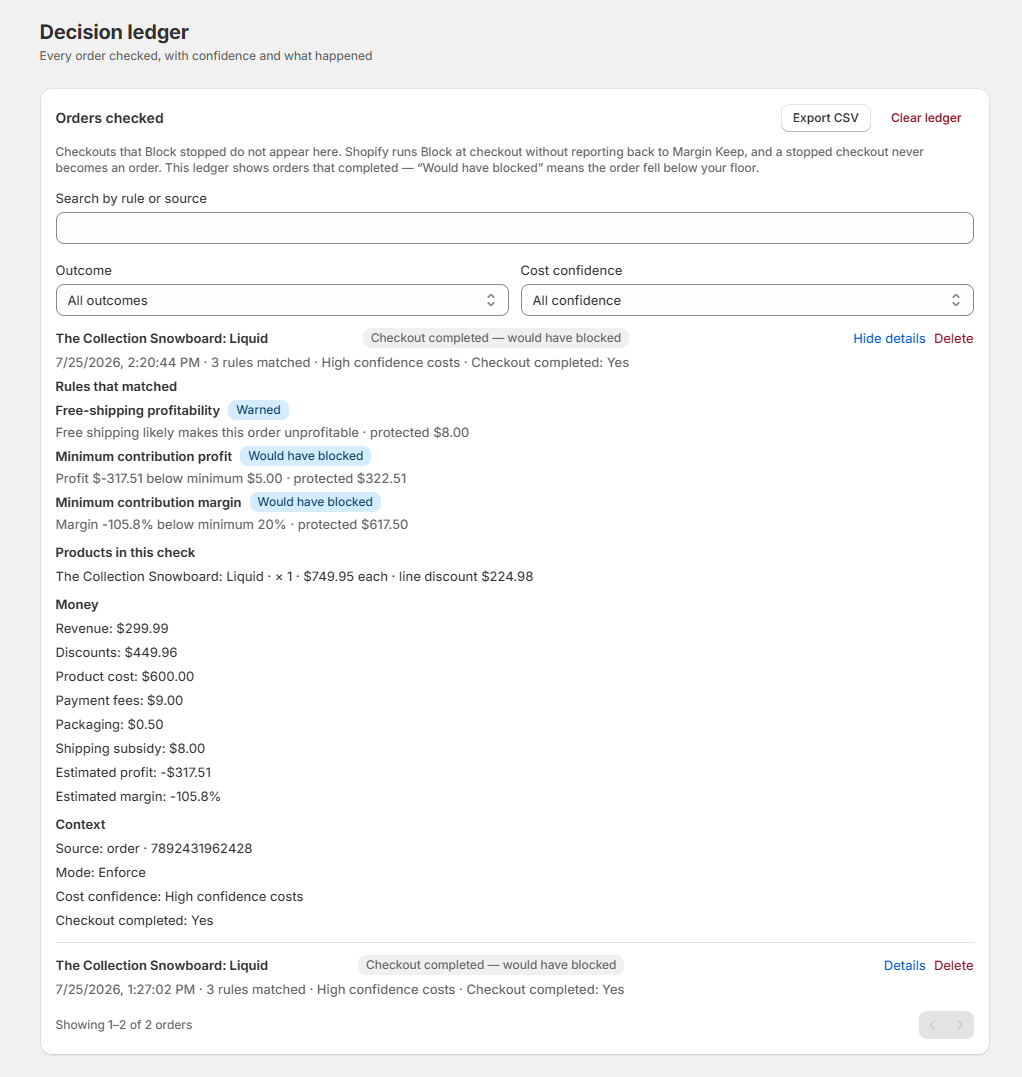
Watch-only is the default. Margin Keep reviews orders and active promotions, logs every rule match on the Decision ledger (including what would have been blocked), and shows estimated profit protected on Overview.
Protect is campaign insurance: peak-sale floors, loss budgets, Slack/Teams alerts, and Admin pause from audit. It also adds warn (log and alert only) and optional block (can stop checkout when costs are known and the cart is below your floor). Missing or uncertain costs never block checkout. Use Promotion audit to pause a bad discount before you turn on block.
What the ledger can and cannot show
The ledger records orders that completed. Checkouts that Block stopped never become orders, and Shopify runs Block at checkout without reporting back to Margin Keep — so stopped checkouts do not appear here. “Would have blocked” means the order fell below your floor, not that checkout was stopped. Test Block with a below-floor cart on a development store instead of looking for it in the ledger.
To tidy up test data or old history, use Delete on a single card or Clear ledger to remove everything. This only deletes Margin Keep's records — your Shopify orders are unchanged — and deleted checks stop counting toward the protected profit totals on Overview, so export a CSV first if you want a copy.
Was this page helpful?