Scan discounts and sale prices
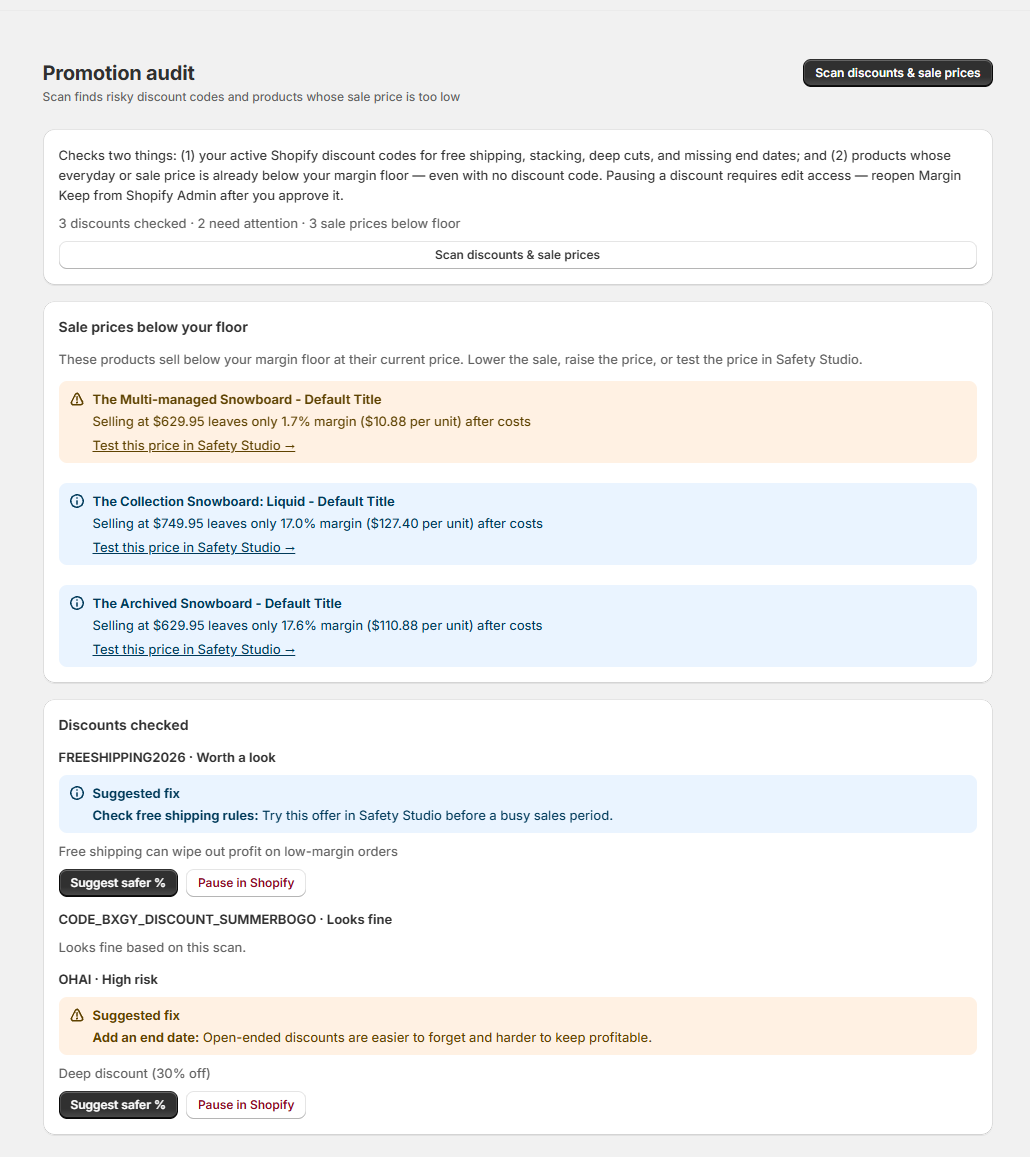
One Scan checks your active discount codes and your product sale prices, then lets you suggest a safer discount or pause a risky one in Shopify.
Open Promotion audit and click Scan discounts & sale prices. Margin Keep checks two things in one pass.
What the scan checks
- Discount codes and automatic discounts: free shipping, discounts that stack together, deep cuts (30% or more), and discounts with no end date.
- Sale prices: products whose current price (including a compare-at sale) already falls below your margin floor after costs — even when no discount code is involved.
Why some rows say "Looks fine"
The scan lists every active discount, not only the risky ones. A discount marked "Looks fine" passed the checks in this scan — it is time-boxed, not too deep, and not stacking in a risky way. This makes it easy to confirm your safe offers at a glance.
Fix a risky finding
On a risky discount you can suggest a safer discount % or pause the discount in Shopify (Protect). For a low sale price, open Safety Studio to test the price, then raise the price or reduce the sale. Pausing needs permission to change discounts — reopen Margin Keep from Shopify Admin after you approve that access. Margin Keep always asks you to confirm before pausing.
Was this page helpful?